Convert a PDF invoice to ZUGFeRD
Your existing PDF invoice becomes a hybrid file: the same visible page, with the invoice data embedded inside it as XML.
- In your account
- 10 documents a month free
- One file: PDF/A-3 with XML
- You confirm every field
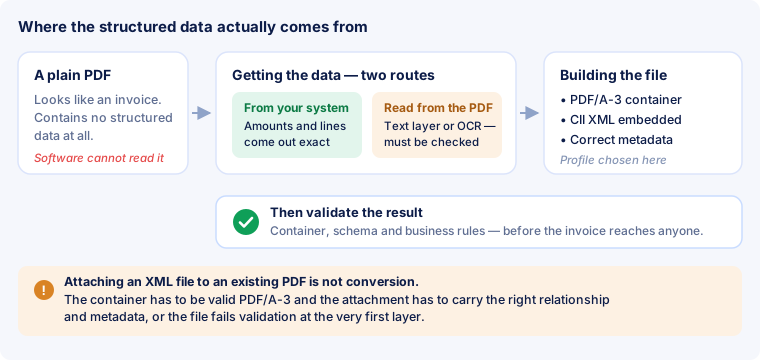
An ordinary PDF contains no structured data — it may look identical to a real ZUGFeRD invoice, but there is no XML for software to read. So converting means two things: obtaining the invoice data, and building a correct file from it.
No converter does the first part on its own. It reads the PDF, shows you every field and marks what needs a second look — the file is built only after you confirm.
Conversion runs inside the account. An account is free, and so are the first 10 documents each month.
In three steps
In your account, under “Convert PDF”. One file per run, exactly as it was produced or received — do not open and re-save it first.
Amounts, tax rates, parties, dates and line items appear in a form. What was filled in for you and what needs checking is colour-marked. This is where you correct things, before anything is built.
From the confirmed data you get a PDF/A-3 with embedded CII XML in the profile you chose. You can then have the result validated against the EN 16931 rules.
What actually happens
The middle step decides whether the result can be trusted, so it is spelled out here.
Most software-produced invoices have one. The text can be read directly; the real work is in the layout — which number is the net amount, which is the tax, which rows belong to the line-item table.
A scanned invoice is only an image. The characters have to be recognised first and interpreted second, and every recognition error turns into a wrong figure downstream. That is why the confirmation step is not a formality for scans.
Layout-based extraction from an arbitrary invoice is not yet good enough to be trusted blindly on tax amounts, totals and identifiers. A tool that promises a finished e-invoice from any PDF in thirty seconds promises more than the state of the art delivers.
In full, with a worked example and typical mistakes: Convert a PDF invoice.
What you get
A PDF/A-3 with the XML attached and declared in the metadata. Not a PDF with an XML beside it — many recipients would not recognise that as an e-invoice.
BASIC, EN 16931 or EXTENDED. Normally EN 16931: it matches the standard and is accepted everywhere. We deliberately do not offer MINIMUM or BASIC WL — they do not count as an e-invoice for VAT purposes.
The look of the invoice is not replaced but supplemented with the structured data. A recipient who has not switched to anything yet opens the file as a PDF, exactly as before.
What it costs
A conversion counts against the same allowance as an invoice you create yourself — a document is a document, wherever it came from.
10 documents a month, plus 10 validations a day. No credit card, no commitment. Enough to try it out and for the occasional invoice.
200 documents a month and validation without a limit. Also €190 a year.
Documents without a limit, plus batch processing: several PDF invoices in one run, the result sent as a ZIP archive by email. Also €490 a year.
Frequently asked questions
Do I need an account?
Yes. Unlike invoice checking, conversion runs only inside the account — it produces a document that belongs to you and files it in your history. The account is free, and so are the first 10 documents each month.
Can I convert a scan?
Technically yes: the characters are recognised and the values proposed. Expect more corrections than with a software-produced PDF, and look especially closely at amounts, tax rates and identifiers.
Does the invoice keep its appearance?
Yes. The visible page is yours; it is not re-typeset but moved into a PDF/A-3 container that additionally holds the XML.
Which profile should I choose?
EN 16931, unless a recipient asks for something else. BASIC is enough for simple invoices; you need EXTENDED only for fields the standard does not know. Details under Profiles.
What if a mandatory detail is missing from the PDF?
Then it cannot appear in the XML either — nobody will invent it. If, say, the buyer VAT number or a delivery date is missing, add it during the confirmation step. Without those details the file would later fail the business rules.
Do I have to convert my whole archive?
Usually not. The obligation covers new invoices from the relevant date onwards, not what you issued in the years before. A document must be kept in the form in which it was issued — the deadlines are under Deadlines and obligations.
How do I know the conversion worked?
From the validation report. Run the finished file through the invoice check: clean on all three layers means the container, the schema and the business rules are all in order.
What you should know
What to read next

Convert an invoice?
Create an account, upload the PDF, confirm the data — the finished file is then in your document history.
Already have a ZUGFeRD file and only want to know whether it is valid? Checking is free and needs no sign-up.