
You have years of invoices as ordinary PDFs, and now a customer asks for a structured e-invoice. The obvious question is whether you can simply convert what you already have. The honest answer has two halves: the technical part is straightforward, and the part that decides whether the result is trustworthy is not.
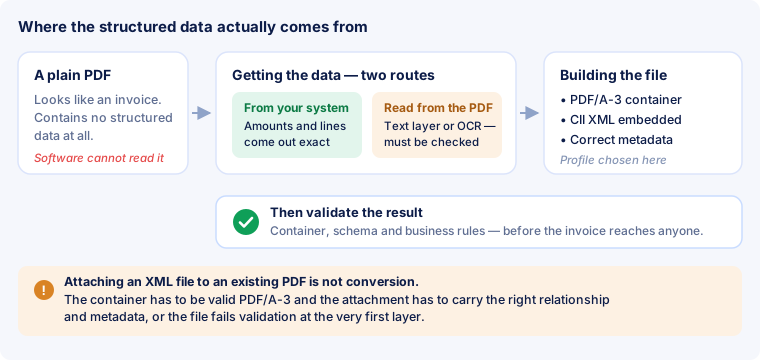
The distinction matters because the word "convert" hides a step. A plain PDF contains no structured data at all. Visually it may be indistinguishable from a real ZUGFeRD file, but there is no embedded XML for software to read. Converting therefore means two separate things: obtaining the invoice data, and then building a correct file with that data inside.
Step 1 — where the data comes from
There are two routes, and they are not equally reliable.
From the system that produced the invoice
If the PDF was generated by accounting or invoicing software, that software still holds the underlying figures: amounts, tax rates, line items, dates, identifiers. Feeding those numbers into the generator is the reliable route, because nothing has to be guessed — the data is already exact and already structured.
This is worth insisting on even when it feels like more work. Re-deriving figures from a rendered page is an exercise in reconstructing something that already exists somewhere else in exact form.
Reading the data out of the PDF
When only the PDF exists — a supplier's invoice, an archive, a document from a system you no longer run — the data has to be recovered from the file itself. Two cases:
- The PDF has a text layer. Most PDFs produced by software do. The text can be read directly, and the work is in understanding the layout: which number is the net total, which is the tax, which lines belong to the table.
- The PDF is a scan. A photographed or scanned invoice is just an image; the characters have to be recognised first (OCR), and only then interpreted. Every recognition error becomes a wrong figure downstream.
This step needs a human. Layout-based extraction from an arbitrary invoice cannot yet be trusted to be accurate for the figures that matter — VAT amounts, totals, identifiers. Every serious workflow puts the extracted values in front of a person to confirm before the file is built. A converter that promises a finished e-invoice from any PDF in thirty seconds, with nothing to check, is promising something the state of the art does not deliver.
Step 2 — building the file
Once the data is confirmed, it has to be embedded into a PDF/A-3 container. This is where a lot of homemade attempts fail, because attaching an XML file to a PDF in an editor is not the same thing.
A correct hybrid file requires:
- A valid PDF/A-3 container — the archival PDF variant, with fonts embedded and colour profiles declared.
- The XML attached with the right relationship (
AFRelationship) and the expected filename, so receiving software recognises it as invoice data rather than an arbitrary attachment. - XMP metadata declaring which standard and which profile the file claims to follow.
- A profile that matches the data you actually have. Claiming the EN 16931 profile while omitting fields it requires produces a file that fails validation; see profiles.
What about PDF24, Adobe Acrobat, DATEV or Lexware?
This comes up constantly, so it is worth answering plainly.
- General PDF tools — Acrobat, PDF24 and similar — can attach a file to a PDF and can often produce PDF/A. What they do not do is build a valid CII invoice XML from your invoice, because they do not know what an invoice is. Attaching a hand-made XML gets you a file that fails at the first validation layer.
- Accounting and invoicing software — DATEV, Lexware and their competitors — increasingly produce ZUGFeRD directly, and when your invoices originate there, that is by far the best route: the data never leaves its structured form. What these systems generally do not offer is converting an arbitrary third-party PDF that did not come from them.
- Dedicated converters sit in between: they read the PDF, propose the data, and build the hybrid file. Their weak point is always the reading step, which is why the confirmation screen matters more than the conversion speed.
Do you actually need to convert your archive?
Usually not, and this saves a great deal of pointless work.
In Germany, receiving structured invoices has been mandatory since 1 January 2025; issuing them becomes mandatory from 1 January 2027 for businesses with more than €800,000 turnover in the previous year, and from 1 January 2028 for the rest. Small-value invoices up to €250 gross and B2C sales are excepted, and small businesses under the Kleinunternehmer rule are exempt from issuing.
None of that applies retroactively to invoices you have already issued. Those stay valid in the form they were issued, and they have to be kept in that form for the retention period. Converting an old archive to ZUGFeRD is therefore an optional, usually unnecessary project. What matters is that invoices you issue from now on are produced as structured documents in the first place.
The cases where converting existing PDFs genuinely helps are narrower: a customer who will only accept structured invoices for documents already sent, a migration between systems, or an incoming supplier invoice you want to book automatically.
Always validate the result
A converted file should never go out unchecked. Conversion has more places to go wrong than generation from scratch, because the data passed through an interpretation step. Run the finished file through a validator and look at all three layers — container, schema and business rules — before it reaches anyone. How that works is covered in how validation works, and the practical walkthrough is in how to validate an invoice.
Two failures are especially common after conversion:
- Totals that do not reconcile — rounding differences between line sums and the document total, reported as
BR-CO-*codes. - A VAT category without its required justification — for example an exempt or reverse-charge invoice with no exemption reason given.
Both come from the extraction step, not from the file format, which is exactly why the confirmation screen exists. See business rules for what these codes assert.
What you need to gather first
A structured invoice requires entries that an ordinary PDF invoice does not always show. Before you start, go through this list — if something is missing, no tool can help, it has to be obtained.
| Entry | Field | On a normal invoice? |
|---|---|---|
| Invoice number, date, currency | BT-1, BT-2, BT-5 | always |
| Seller name and address, country code | BT-27, BG-5, BT-40 | almost always — the country rarely as a code |
| Buyer name | BT-44 | always |
| Seller VAT or tax registration number | BT-31 / BT-32 | usually, but often without the country prefix |
| Lines with quantity, unit price, net amount | BG-25 | yes, but as a picture of a table |
| VAT rate and tax amount per rate | BT-119, BT-117 | usually only as a total, not per category |
| Payment details, IBAN | BG-16, BT-84 | usually — printed with spaces |
| Buyer reference; for public bodies the routing id | BT-10 | rarely — has to be asked for |
| Seller contact point, phone, email | BG-6 | rarely complete |
| Reason for exemption or reverse charge | BT-120 / BT-121 | as a sentence in running text, not as a field |
The last three rows are the usual reason an otherwise clean conversion fails: the information exists in the transaction but not on the page.
Step by step
- Establish where it came from. Does the program that produced this invoice still exist? If so, export the data from there and skip the extraction entirely. That is not a detour, it is the shortcut.
- Check whether there is a text layer. Select an amount in your PDF reader with the mouse. If it can be selected and copied, there is text. If the selection jumps across the whole page, it is an image — a scan, and the road gets longer.
- Extract and map the data. Recognised characters have to become fields. This is the step where mistakes are made; the section below shows exactly where.
- Add what is missing. Routing id, contact details, exemption reason — see the list above. None of it can be guessed.
- Build the file. Pick a profile (EN 16931 as a rule), generate the XML, attach it inside a PDF/A-3. This step is pure mechanics and rarely goes wrong.
- Validate, then send. Container, schema, business rules. Then compare the amounts in the report with the ones on the page — validation says nothing about whether 850.00 was the right figure in the first place.
Steps 1 to 4 cost the time. Step 5 takes seconds, and step 6 is the only one that tells you whether the earlier ones were right.
A worked example
Theory does not help much here, so here is the whole path on one invoice. The PDF has a text layer, so this is the good case — no scan, no character recognition. What a text extractor pulls out of the page looks roughly like this:
| Line from the text layer |
|---|
Muster Werkzeug GmbH · Industriestr. 4 · 45127 Essen |
Rechnung Nr. 2026-0417 Kundennummer 88213 |
Rechnungsdatum 04.09.2026 Lieferdatum 01.09.2026 |
3 Spannzange SZ-12 249,00 747,00 |
1 Adapterplatte A-4 120,50 120,50 |
Rabatt 2 % -17,50 |
Nettobetrag 850,00 |
zzgl. 19 % USt 161,50 |
Rechnungsbetrag 1.011,50 |
USt-IdNr. DE812345678 IBAN DE89370400440532013000 |
A human reads that in two seconds. To a program these are just characters with coordinates, and they have to become a mapping onto the fields of the standard:
| Field | Value | What it hangs on |
|---|---|---|
BT-1 invoice number | 2026-0417 | sits on the same line as the customer number — confusing the two is the single most common misgrab |
BT-2 issue date | 2026-09-04 | national format on the page, ISO in the XML |
BT-27 seller | Muster Werkzeug GmbH | first line of the header — unless the header is a logo image |
BT-31 VAT number | DE812345678 | unmistakable, therefore reliable |
BT-131 lines | 747.00 and 120.50 | the table has to be recognised as a table, not as a block of text |
BT-107 allowance | 17.50 | a minus sign in front; miss it and the discount is added instead |
BT-109 net | 850.00 | — |
BT-117 tax | 161.50 | the rate 19 sits in the same piece of text as the amount |
BT-112 gross | 1011.50 | the thousands separator has to go — 1.011,50 read as a number is otherwise 1.01 |
BT-84 IBAN | DE89370400440532013000 | printed with spaces, belongs in the XML without them |
Four places in this single invoice are treacherous, and none of them is exotic: the invoice number next to the customer number, the date format, the thousands separator and the sign of the discount. That is exactly why a human check stands at the end of this path and not an automation.
Get the mapping right and the rest follows: 747.00 + 120.50 = 867.50, less 17.50 is 850.00, plus 19 % is 1011.50. These are the same chains the business rules recompute.
Special case: the invoice is a scan
With a scanned or photographed document there is no text layer — there is an image. Character recognition sits between the image and the fields, and it does not behave like a mistake you notice: it produces not an empty field but a wrong one. An 8 becomes a 3, 1.011,50 becomes 1.011,5D, an O becomes a 0.
Three things separate usable from dangerous:
- Resolution. Below 300 dpi recognition turns into guessing. A photo of a screen is useless for this purpose.
- A straight page. Sheets fed in at an angle shift columns against each other, and “this number belongs in this column” is the first thing to break.
- Check every number afterwards. Not a sample. Totals, tax amounts, identifiers and the invoice number are read individually against the page.
If the document came from a supplier, the shorter road is almost always to ask them for the structured file instead of reconstructing it from their paper. They have to be able to receive one anyway, and as a rule their software can issue one too.
Common mistakes and the messages they trigger
Conversion produces the same mistakes over and over, and because validation answers each with a rule code, the code points back at the cause.
| What goes wrong | Message | Fix |
|---|---|---|
| Thousands separator read along, gross total lands as 1.01 | BR-CO-15 | strip separators before conversion, not after |
| Discount taken without its minus sign | BR-CO-13 | an allowance goes into BT-107 as a positive amount, not as a negative line |
| Line totals recomputed from quantity × price instead of taken as printed | BR-CO-10 | use the printed line total — that is the binding one |
| Tax amount rounded, taxable amount not | BR-CO-17 | both values to two decimals, half up |
| VAT number taken from master data without the country prefix | BR-CO-09 | prepend the country code, strip spaces |
| A national tax number found instead of a VAT number, both fields left empty | BR-CO-26 | put the tax number in BT-32 rather than discarding it |
| IBAN taken with spaces | BR-DE-19 | strip the separators |
| Line table not recognised, only totals carried over | BR-16 | one collective line for the total beats none at all |
One message that is not a fault. Every converted ZUGFeRD file shows BR-DE-21. All it says is that the file is not an XRechnung — which is true, and intended.
Frequently asked questions
Can I convert a scan?
Technically yes, reliably no. A scan is an image; the characters have to be recognised first, and every recognition error turns into a wrong number in a field that matters. If it cannot be avoided, check every figure by hand — above all totals and identifiers.
Can I convert my whole archive at once?
You can, but you almost never need to. The obligation covers invoices you issue from the deadline onwards, not your archive. Old invoices stay valid and retainable as PDFs. Converting one makes sense only when a recipient asks for a specific old invoice in structured form.
Does the invoice still look the same?
Yes. In a hybrid invoice the visible page is unchanged — the XML is attached to it, not put in its place. Anyone opening the file in a PDF reader sees what they saw before.
What if the PDF is missing something the standard requires?
Then it cannot be extracted either, and it has to be added. The most frequent gaps are the buyer reference for public bodies (BR-DE-15) and the seller's contact details (BR-DE-2). Neither is often complete on an ordinary invoice.
Which profile should I choose?
EN 16931 as a rule — that is the profile matching the standard and the one recipients expect. BASIC is enough for simple invoices, EXTENDED is only needed for cases the standard does not cover. The differences are under profiles.
How do I know the conversion worked?
Not from the file opening. Load it into a check and read the report: container, schema and business rules all have to pass. Then compare the figures in the report with those on the page — validation confirms conformity, not correctness.
In short
- Converting means obtaining data and building a file. The second step is trivial; the first decides the outcome.
- From the system beats from the PDF. If the figures still exist structured somewhere, take them from there.
- Text layer yes, scan only with a check afterwards. Character recognition produces wrong numbers, not empty fields — and wrong numbers do not draw attention.
- Four traps cover most errors: invoice number next to customer number, date format, thousands separator, sign of the discount.
- Always validate before you send — and look the rule code up in the code reference instead of guessing.
- The archive does not have to be converted. The obligation applies to new invoices.
What to expect, honestly
Fully automatic conversion — upload any PDF, receive a validated hybrid file, check nothing — is an active area of development and depends on data extraction becoming reliable enough to trust with tax figures. It is not there yet for arbitrary layouts, and anyone who tells you otherwise is selling the demo rather than the general case.
The route that works today is unglamorous and dependable: take the data from the system that produced it where you can, confirm it once where you cannot, let the generator handle the PDF/A-3 and XML construction, and validate before sending.