
The visible page of a ZUGFeRD invoice is for people. The embedded XML is for software — and software reads no letterhead, only fields with fixed names in fixed places. This page shows which fields exist, where they sit, and which of them actually decide between acceptance and rejection.
The XML follows the UN/CEFACT syntax Cross Industry Invoice (CII), one of the two syntaxes EN 16931 recognises. The other is UBL, common in the Peppol network. They say the same things; they only spell them differently.
The three blocks
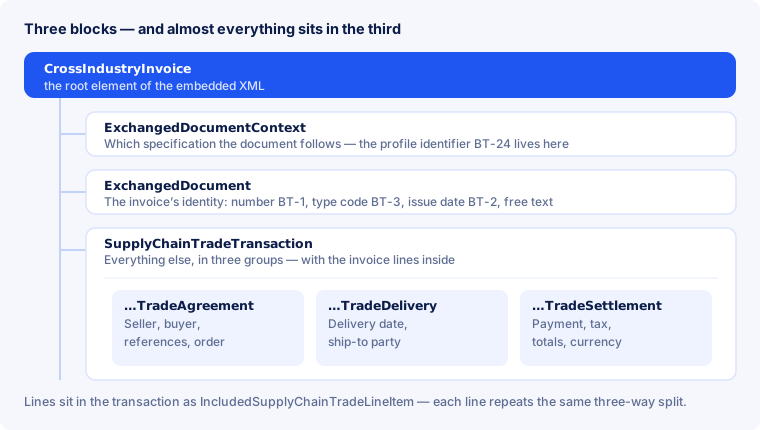
ExchangedDocumentContext— what the document was built against. The profile identifierBT-24lives here (see Profiles), and nowhere else. A recipient reads it first, because it decides which rule set they validate against.ExchangedDocument— the invoice’s identity: numberBT-1, type codeBT-3, issue dateBT-2and free text.SupplyChainTradeTransaction— everything else, in three groups: TradeAgreement (who with whom, under which references), TradeDelivery (what, when, where to) and TradeSettlement (payment, tax, totals).
Each invoice line sits in the transaction as its own IncludedSupplyChainTradeLineItem — and repeats the same three-way split in miniature: price agreement, delivered quantity, settlement of that line.
Why the fields are called BT and BG
The standard describes meaning first and spelling second. A BT (Business Term) is a single field; a BG (Business Group) is a group of related fields. “Seller name” is BT-27 whether the document is written in CII or UBL — the XML elements differ, the field is the same.
In practice that means: when a validation report objects to BT-31, you do not need to know the XML path. You need to know which piece of information is missing — here, the seller’s VAT identifier. The rule codes that point at these fields are covered in Business rules.
What every invoice must carry
The standard requires the following fields without exception. If one is missing, validation reports a BR-* rule and the document is invalid.
| Field | Meaning | Rule |
|---|---|---|
BT-1 | Invoice number | BR-02 |
BT-2 | Issue date | BR-03 |
BT-3 | Document type code | BR-04 |
BT-5 | Invoice currency | BR-05 |
BT-27 | Seller name | BR-06 |
BG-5 | Seller postal address | BR-08 |
BT-44 | Buyer name | BR-07 |
BG-25 | at least one invoice line | BR-16 |
BT-106 | Sum of line net amounts | BR-12 |
BT-109 | Total amount without VAT | BR-13 |
BT-112 | Total amount with VAT | BR-14 |
BT-115 | Amount due for payment | BR-15 |
What is striking is what the list does not contain: the VAT identifier. It is not always mandatory — but as soon as you show tax or apply reverse charge, BR-CO-09 requires it, complete with its country prefix.
Seller details: the letterhead as fields
On paper, the seller is whatever sits in the top left. In the XML these are named fields, and the recipient’s software reads those, not your layout.
BT-27— Seller name. The legal name, not the brand in the logo.BG-5— Postal address, with a country code. Without the country code the invoice does not get through.BT-31— VAT identifier, with its prefix (DE…,FR…).BT-32— Tax registration identifier, where that is used instead.
A typo in BT-31 is the most expensive of the cheap mistakes: it does not show up when you create the file, it repeats on every invoice for a year, and it surfaces only when a recipient checks the number. Which is why these details belong in the company profile once, not retyped into every invoice.
Buyer reference and order number: the fields that decide whether you get paid
An arithmetically flawless invoice can come back for a reason that has nothing to do with amounts: the recipient cannot attach it to a department, a contract or an order.
BT-10— Buyer reference. An identifier the customer states in advance. For public-sector buyers in Germany this is the routing ID (Leitweg-ID), and the national ruleBR-DE-15makes the field mandatory.BT-13— Purchase order reference. The customer’s order number, which their system uses to match invoice and order automatically.
Large private buyers now work the same way: no reference, no automatic posting. Ask for both when you take the job, not when you send the reminder.
Delivery date and invoicing period are two different things
An invoice carries at least two dates with different meanings, and confusing them is one of the quieter sources of trouble.
| Field | What it means |
|---|---|
BT-2 | Issue date — when the document was created. Always required. |
BT-72 | Actual delivery date — when the goods were handed over or the service performed. |
BG-14 with BT-73/BT-74 | Invoicing period, start and end — for subscriptions, retainers, monthly billing. |
German law requires the time of supply on the invoice, so leaving it out of the structured file is not a matter of neatness. For recurring billing, the period also tells the recipient what they are paying for without reading the line text — and BR-29 checks that the start date does not fall after the end date.
Lines: quantity, unit, price
A line carries four things that belong together:
BT-129— the quantity;BT-130— the unit of measure code;BT-146— the item net price;BT-131— the line net amount.
The unit is not free text. “pcs”, “pack” or “hrs” will not do — what is required is a code from UN/ECE Recommendation 20, so that both systems mean the same thing by it.
| Code | Unit |
|---|---|
H87 | piece |
C62 | one (dimensionless unit) |
HUR | hour |
DAY | day |
KGM | kilogram |
LTR | litre |
MTR | metre |
Two codes for “piece” cause regular confusion. H87 is the piece as a countable item; C62 is “one” as a dimensionless unit. Both are accepted, but they do not mean the same thing, and a recipient with a strict item master will notice. E-Rechnung Pro writes H87 throughout in the invoices it generates; there is currently no unit picker when you enter a line.
Allowances, charges and shipping
A line reading “minus 10%” is readable to people and meaningless to software. The standard has its own places for this: BG-20 for document-level allowances and BG-21 for charges, plus their counterparts on each line.
Every allowance and charge carries three things:
- an amount —
BT-92for an allowance,BT-99for a charge; - a reason, as plain text or as a code (
BT-98andBT-105), so the recipient posts it correctly; - a tax category and rate, because a discount reduces the taxable amount and follows the same treatment.
Shipping, packaging and payment surcharges belong here too, not inside the unit price. Stated this way they survive the recipient’s rounding checks; hidden in the unit price they produce BR-CO-* discrepancies nobody can trace afterwards.
Payment terms
“Payable within 14 days” is a sentence. In a structured invoice it becomes:
BT-9— the payment due date, as an actual date rather than a description;BT-20— the payment terms in text, including any early-payment discount;BG-16— the payment instruction: means of payment, IBAN, account holder.
The point of this is that the recipient’s system can schedule the payment without reading free text. A due date written as a sentence rather than a date means, in practice, that your invoice lands in the queue where somebody handles it by hand.
More than one currency
Where the invoice is issued in one currency but VAT is accounted for in another, the standard wants both stated rather than assumed:
BT-5— the invoice currency;BT-6— the VAT accounting currency, where it differs;- the exchange rate as at the issue date.
Missing these fields is a common reason for cross-border invoices being rejected — and one you cannot see by looking at the amounts.
A credit note is not an invoice with a minus sign
This is the mistake accountants bring with them from plain PDFs. In the standard a credit note is a document type of its own, controlled by BT-3:
- 380 — invoice;
- 381 — credit note.
The amounts inside are positive; the direction comes from the type code. It also needs a reference to the document being corrected — BG-3 carrying the preceding invoice number (BT-25), which BR-55 checks. An “invoice with negative amounts” does not pass validation and cannot be posted by the recipient either.
Frequently asked questions
Do I need to be able to write the XML by hand?
No. You should be able to read what a validation report says — that is a different thing. A report names the rule code and the field; from there the path leads into the system that produced the invoice, not into an XML editor.
Where do I find the profile in the file?
In the element GuidelineSpecifiedDocumentContextParameter in the first block — that is BT-24. Which URN means what is covered in Profiles.
Is CII better than UBL?
No, it is a different spelling of the same model. ZUGFeRD and Factur-X use CII, Peppol mostly UBL. If someone insists on UBL, it is about the network they receive on, not about the quality of the data.
May I add my own fields?
Only via the EXTENDED profile, and even then they are understood only by software that knows them. Anything the standard models belongs in the standard’s own fields — that is where it gets read.
Why does validation object to a total when the page is correct?
Because it adds up the fields, not the page. The most common cause is discounts buried in the unit price instead of being stated as BG-20. The rule families for this are in Business rules.
Does the XML have to agree with the visible page?
Yes, and where they differ the XML governs. The German finance ministry’s ruling of 15 October 2025 makes this explicit for hybrid formats: the structured part prevails, and a discrepancy puts the input VAT deduction at risk.
How do I look at the XML of an invoice I received?
Most easily by validating it — the report shows the profile, the fields and the findings. The procedure in detail is in Validate an invoice.
In short
- Three blocks, and almost everything sits in the third — totals and tax are right down in the settlement.
- BT is a field, BG is a group. The number is syntax-independent:
BT-27is the same seller name in CII and in UBL. - Twelve fields are mandatory without exception, and the VAT identifier joins them as soon as tax is shown.
BT-10andBT-13decide whether you get paid, not whether the file is valid — for German public-sector buyersBR-DE-15turns that into a requirement.- Units are codes from UN/ECE Rec 20, not free text.
- Discounts belong in
BG-20, not in the unit price — otherwise the totals do not add up. - A credit note is type code 381, with positive amounts and a reference to the original invoice.
Want to see the XML behind your own invoices without building it? Create a free account — or check an existing file without signing up and trace the structure on a document of your own.