
Checking an invoice takes seconds. A rejected invoice costs a payment cycle — the document goes back, someone works out what went wrong, it is corrected, reissued, and the clock starts again. That mismatch is the entire argument for checking every file before it goes out, and every incoming one before it reaches the books.
This page describes the practical procedure: which file to upload, how a report is put together, how a real report is read line by line, and what to do when something is flagged. What happens inside each check is covered in How validation works.
What exactly are you holding?
Three different things get called an “e-invoice”, and only two of them can be checked.
- A hybrid PDF — a ZUGFeRD or Factur-X file: an ordinary-looking PDF page with invoice XML embedded inside it. Upload the PDF; the XML is extracted automatically.
- A plain XML file — an XRechnung or a CII/UBL document with no PDF around it. Upload it as it is. There is no container to check, so the report starts at the schema layer.
- An ordinary PDF — a printed or scanned invoice with no structured data at all. There is nothing to check: it is a picture of an invoice. Turning it into a real e-invoice is a different job, covered in Convert a PDF invoice.
If you are not sure which of the three you have, just upload it. If the validator finds no embedded XML it says so immediately — and that answer is useful too. The quickest check without any tool is to look at the attachments: a reader that shows file attachments will list an XML file named something like factur-x.xml or zugferd-invoice.xml on a hybrid invoice. If nothing is listed, nothing is inside.
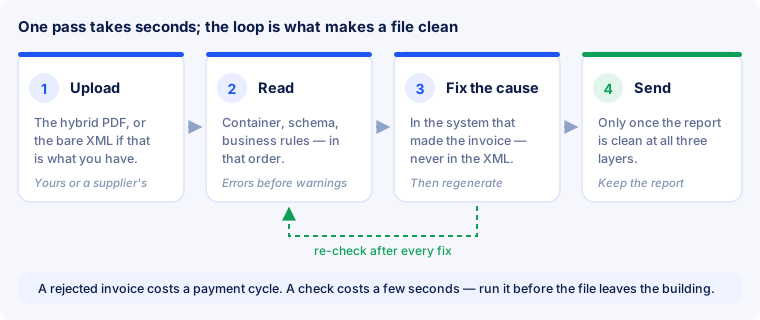
Step 1 — upload the file
Nothing needs preparing. Do not unzip anything, do not pull the XML out by hand, do not rename the file. Upload the document exactly as it was produced or exactly as it arrived — a file that has been unpacked and repacked is no longer the file your recipient sees, and the container checks examine precisely that packaging.
Three things that cost time if you do not know them:
- A ZIP archive is not an invoice. What can be checked is the individual file inside it, not the archive. Extract it and upload the document.
- The file from the mailbox, not the one from the printer. Saving a received invoice again, “optimising” it, or pushing it through a PDF tool means you are checking a different document afterwards — with a container written by somebody else along the way.
- Size. On our public page the limit is 5 MB per file. An invoice well above that almost always carries embedded scans or print-resolution images — which is worth a question of its own.
Step 2 — read the report in order
Results come back in three layers and are read from top to bottom, because a failure on an earlier layer makes the later ones unreliable. If the PDF/A-3 container is broken there may be no dependable XML to examine at all, and the business-rules section is then describing a file nobody can read in the first place.
- Container — is this a valid PDF/A-3 file with the XML attached the way the standard requires? Skipped when you upload plain XML.
- Schema — is the XML well formed, and does every element match its XSD? This layer is strict about form and completely blind to meaning. It flags a date in the wrong format, not a date in the wrong year.
- Business rules — do the amounts add up, is the tax breakdown coherent, is the seller identifiable? This is where most real rejections come from, and where careful reading pays off.
Separate errors from notices before you correct anything. A fatal finding means the document is invalid. A notice means unusual but permitted — often a rule from a national flavour that does not apply to your document at all. Trying to drive notices to zero is the most common way to lose an afternoon to a file that was valid all along.
Anatomy of a message
Every single line of a validation report has four parts. Keep them apart and most findings need no second opinion.
| Part | Example | What you need it for |
|---|---|---|
| Rule code | BR-CO-15 | The lookup key. BR-* comes from EN 16931 itself, BR-DE-* from the German flavour, BR-FR-* from the French one. |
| Severity | fatal / error / notice | Decides whether you have to act or merely take note. |
| Rule text | “The total amount with VAT must equal the total amount without VAT plus the total VAT amount.” | Says why it was flagged — usually quoted from the standard. |
| Location | /rsm:CrossIndustryInvoice/…/ram:GrandTotalAmount | Says where in the XML it sits. The path looks forbidding; only the last piece is needed. |
The location is an XPath — directions through the XML tree. You do not need to be able to read it. Recognising the final element and looking up the rule code is enough: the rule families and the errors that actually occur are listed in EN 16931 business rules, one section per code.
Error, warning, notice — what each rank means
The rank of a message is not a matter of taste; it is part of the rule itself. Three levels occur:
- Fatal. The file cannot be processed at that point — a broken container, XML that will not parse. Checking further is pointless.
- Error. A binding rule is violated. The document is invalid, and a recipient who validates automatically will send it back.
- Notice. Something is unusual but allowed. Very often the notice comes from a national flavour that need not be applied to your document at all.
The best-known case is BR-DE-21. This message appears on practically every valid ZUGFeRD and Factur-X invoice and says only: “This is not an XRechnung.” Which is true — and exactly what you want when you issue ZUGFeRD. Our report already subtracts it, so that a green document does not sit next to a red line. Where you check elsewhere, subtract that one message yourself before judging.
The converse also holds: a recipient is allowed to be stricter than the standard. Some authorities and large companies reject documents that pass every rule because a purchase order number is missing or a different profile was expected. That is not a validation error but a requirement outside the standard — and one you ask about rather than guess.
A real report, line by line
The fastest way to learn the reading is on a worked case. The invoice: three lines, two tax rates, one document-level discount.
| Line | Quantity | Unit price | Net | Rate |
|---|---|---|---|---|
| Consulting | 12 h | €95.00 | €1,140.00 | 19 % |
| Annual licence | 1 | €240.00 | €240.00 | 19 % |
| Printed manual | 3 | €29.00 | €87.00 | 7 % |
| Sum of line net amounts (BT-106) | €1,467.00 | |||
| Document-level allowance (BT-107), 19 % | −€67.00 | |||
| Total without VAT (BT-109) | €1,400.00 | |||
So far everything is correct. The error is in the tax breakdown: the invoicing software deducted the allowance from the net total but not from the taxable base of the 19 per cent rate. What the file actually contains:
| Tax line | Taxable base (BT-116) | VAT (BT-117) | Should be |
|---|---|---|---|
| 19 % | €1,380.00 | €262.20 | €1,313.00 → €249.47 |
| 7 % | €87.00 | €6.09 | already correct |
| Total VAT (BT-110) | €268.29 | €255.56 | |
| Total with VAT (BT-112) | €1,655.56 | €1,655.56 |
The report then looks like this:
- Container: passed. Valid PDF/A-3, XML attached with the expected relationship, XMP metadata present.
- Schema: passed. Every element in its place, every number in the right format.
- Business rules: two errors, one notice.
Error 1 — BR-S-08: for each tax rate, the taxable base must equal the sum of line net amounts at that rate minus the allowances belonging to it. 1,140.00 + 240.00 − 67.00 = 1,313.00; the file says 1,380.00. Location: the 19 per cent line of the tax breakdown.
Error 2 — BR-CO-15: the total with VAT must be the total without VAT plus the total VAT amount. 1,400.00 + 268.29 = 1,668.29; the file says 1,655.56. Location: the grand total in the document header.
Notice — BR-DE-21: the identifier in BT-24 is not the XRechnung one. Correct: this is a ZUGFeRD invoice.
And here is why you read a report instead of working through it: two errors, one cause. The allowance was booked without a tax category. Anyone who takes the second finding on its own and types 1,668.29 into the grand total has not made the file correct — only moved the contradiction: the visible page then says 1,655.56 while the data says 1,668.29, and it is the structured part that counts.
The repair is one click in the invoicing software: assign the tax category “standard rate 19 %” to the allowance. The program then recalculates 1,313.00 → 249.47 → 255.56 → 1,655.56, and the second error disappears together with the first.
Findings that keep coming back
The messages below sit behind most rejections in practice. Each row leads to the detailed section for that code.
| Code | What is flagged | What it nearly always is |
|---|---|---|
| BR-CO-13 | net total does not add up | a discount inside the unit price and at document level — it subtracts twice |
| BR-CO-15 | gross ≠ net + VAT | knock-on effect from the tax breakdown, as above |
| BR-CO-09 | VAT number without country prefix | 123456789 instead of DE123456789 in the master data |
| BR-CO-26 | seller cannot be identified | no VAT number, no tax number and no identifier on file |
| BR-E-10 | exemption without a reason | category set, reason forgotten — it is a free-text field |
| BR-AE-10 | reverse charge without a note | the same thing where the liability is reversed |
| BR-DE-15 | Leitweg-ID missing | an invoice to a German public body without the identifier in BT-10 |
| BR-DE-19 | implausible IBAN | spaces, a typo, or free text in the field |
| BR-DE-1 | no payment details | the IBAN only in the page footer, not as a field |
Step 3 — fix the cause, not the file
Every finding names a rule code and points at a place in the XML. The place tells you where; the code tells you why. Then correct the underlying data in the system that produced the invoice: the missing VAT number in the company profile, the rounding step in the invoicing program, the line item nobody ever entered. Regenerate the document from there.
Editing the XML directly is tempting and almost always wrong, for three reasons:
- The page and the data drift apart. In a hybrid file the visible page and the embedded data are supposed to say the same thing. Hand-patched XML no longer matches the page beside it.
- The error comes back. The cause sits in master data or in a setting. Repairing the file repairs one instance and issues the next invoice with the same defect.
- The file breaks. Change the XML inside a hybrid PDF and the container no longer holds up — the attachment is part of the file, not something laid next to it.
Why the contradiction costs more than the error. In a hybrid invoice it is the structured part that governs, as the German finance ministry stated in its letter of 15 October 2025. Where what a human reads on the page differs from what software reads in the XML, that is not a cosmetic flaw but a risk to the input-VAT deduction. All mandatory details have to be inside the XML; a reference to an attachment does not count.
Step 4 — check again, then send
Run the corrected file once more. Corrections move problems more often than people expect: an added line changes the net total, that changes the tax breakdown, and that can trip a different arithmetic rule. A file is finished when the report is clean on all three layers — not when the first error has gone.
How often to check depends on how fresh the change-over is:
- Every invoice in the first weeks. Early mistakes live in master data and repeat until somebody notices.
- After that, on every change. A new template, a new tax rate, a new payment term, an update to the invoicing program, a new customer with requirements of their own — check once each time.
- Always for files from outside. You did not produce what you receive, and nothing tells you otherwise until the accounting trips over it.
Checklist before sending
Go through it once for your first documents, and again whenever something about your invoicing changes. A validator answers most of it; the rest needs human eyes.
- The file opens in any reader as a normal PDF and the page is readable.
- The profile matches what the recipient asked for — some specify one explicitly.
- Line net amounts add up to the net total, and net plus tax gives the gross total.
- Seller and buyer VAT numbers are present and carry a country prefix.
- Invoice date and due date are filled in.
- Units of measure are standard codes, not free text like “pcs.” or “hours”.
- Every tax category that requires a reason — exempt, reverse charge, export — carries one.
- The figures on the visible page match the figures in the XML.
- The report shows no fatal finding on any layer.
- If a purchase order or reference number was requested, it is in there. German public buyers require a Leitweg-ID; without it the invoice comes back.
Checking invoices you receive
Incoming documents raise slightly different questions, because here you are not checking your own work.
- Does the XML match the page? This is the most commonly forgotten check and the most expensive finding. In a hybrid file the embedded data is what gets booked, and it can differ from what the PDF shows. Where the two diverge it has to be settled with the supplier before the document reaches the books — the structured part governs.
- Is it valid at all? A supplier file that already fails the container check will not load cleanly anywhere — and saying so on day one is cheaper than saying it after the payment run.
- Are the tax details plausible? VAT number, category and rate — or a stated reason where no tax is charged.
- Is it a duplicate? Structured data makes double entries far easier to spot than scanned paper ever could. The pair of invoice number and seller VAT number identifies a document uniquely.
- What are you archiving? What must be kept is the structured part, unchanged — eight years under § 14b of the German VAT Act. A filing system that keeps only the printout does not satisfy that; details in Archiving and GoBD.
What a clean report does not prove
Validation is proof of conformance, not an audit, and being precise about its limits saves arguments later.
- It does not confirm correctness. A file can pass every rule and still show the wrong price, the wrong customer or the wrong date. What is checked is internal consistency, not truth.
- It does not guarantee acceptance. A recipient may require order numbers, references or profiles beyond the standard.
- It does not replace tax advice. Whether an invoice satisfies a country’s tax law is a different question from conformance to EN 16931.
- It says nothing about delivery. A valid file that lands in the wrong inbox, or arrives on a channel the recipient does not read, is as unpaid as an invalid one.
Frequently asked questions
Do I have to extract the XML from the PDF first?
No. Upload the PDF as it is. Extracting and repacking changes exactly the part the container check assesses — you would end up validating a different document from the one your recipient gets.
The report shows notices but no errors. Can I send?
Yes. A notice means “unusual but permitted”, and very often it comes from a national flavour that need not be applied to your document. Read it once, then send.
Why does every one of my ZUGFeRD invoices report BR-DE-21?
Because that rule checks whether the identifier in BT-24 is the XRechnung one. On a ZUGFeRD invoice it is not — and should not be. The message is not a defect in your file; our report already subtracts it.
Can I check an invoice I sent long ago?
Yes, and it is worth doing in two cases: when a recipient complains and you want to know whether the file is to blame, and as a spot check after any change to templates or master data. Checking does not alter an invoice that has already gone out.
The report is clean but the recipient still rejects it. Now what?
Then the requirement lies outside the standard. The three most common: a missing purchase order or reference number, a specific profile that was expected, or a channel the invoice has to be submitted through. Ask for the rejection reason verbatim — it almost always names the field.
How do I check a plain XRechnung?
The same way: upload the XML file. There is no container, the report starts at the schema layer, and the German BR-DE-* rules apply in full here, including the Leitweg-ID for public bodies.
How do I know what version the check was run against?
A usable report names its rule set. Ours checks against the Schematron rules of EN 16931 and the format rules of ZUGFeRD and Factur-X; the basis is Mustang 2.26.0 of 25 August 2026. The current format version is ZUGFeRD 2.5.2 / Factur-X 1.09.2 and applies from 1 September 2026.
Is my invoice stored?
Not on the public checking page. The file exists as a temporary upload for the duration of the check and is deleted when the request ends. If you want a history of your checks, it lives in the account.
In short
- Upload the file as it is — do not unpack it, do not save it again.
- Read from the top down: container, schema, business rules. A failure above makes everything below unreliable.
- Separate errors from notices before changing anything. BR-DE-21 belongs on every ZUGFeRD invoice.
- Several findings often share one cause. Look for the cause first, then do the arithmetic.
- Correct in the source system, never in the XML — otherwise page and data contradict each other, and the data governs.
- Check again after every correction, and compare page against XML on invoices you receive.
Check a file here
Our validator runs all three layers on the same open-source foundation the industry has settled on — the Mustang project — and reports every finding with its rule code, severity and location. It is free and needs no sign-up: you upload the file and get the report. The limits are 5 MB per file and a dozen checks per hour per sender — enough for everyday work and tight enough to keep the page from being taken over by scripts. Uploaded files are not stored: the document exists as a temporary upload for the duration of the check and is deleted when the request ends.