
Open a hybrid invoice in any PDF viewer and you see a normal document: a letterhead, line items, a total. That view says nothing about whether the file is valid. What matters to the recipient's accounting software is the XML buried inside the file, and the way that XML is attached to the PDF.
This is the most common surprise for people new to the format. A PDF that was printed to disk and then had an XML file "attached" in a PDF editor looks identical on screen to a real ZUGFeRD invoice, and fails validation immediately. Validation exists to catch exactly that difference — between looking right and being right.
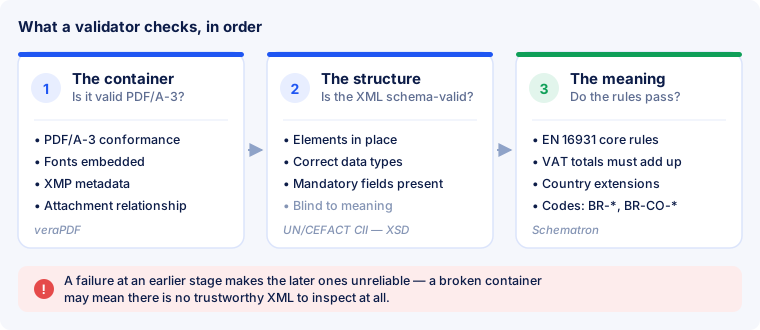
Layer 1 — is the file really PDF/A-3?
A hybrid invoice is not simply a PDF with an attachment. It has to be a valid PDF/A-3 file — the archival variant of PDF, designed to stay readable for decades — and the invoice XML has to be embedded in a particular way.
At this layer a validator checks, among other things:
- PDF/A-3 conformance — the structural requirements of the archival format itself.
- Embedded fonts. PDF/A forbids relying on fonts installed on the reader's machine; everything needed to render the page must be inside the file.
- Colour profiles declared explicitly rather than assumed.
- XMP metadata — a machine-readable block describing the file, including which invoice standard and profile it claims to follow.
- The attachment relationship. The embedded XML must carry the correct relationship (
AFRelationship) and the expected filename, so software can tell the invoice data apart from any other attachment.
Tools in this area generally use veraPDF, the open-source PDF/A validator, for this layer. A file that fails here is not a valid e-invoice, however good its XML may be.
Layer 2 — is the XML well-formed and schema-valid?
The embedded data uses the UN/CEFACT Cross Industry Invoice (CII) syntax — the data model described in our article on the XML structure.
This layer parses that XML and checks it against its XML Schema (XSD): every element where the schema expects it, correct data types, mandatory elements present, values in the right format. A date written as 31/12/2026 where the schema wants 20261231 fails here.
Schema validation is strict about form and completely blind to meaning. An invoice can be perfectly schema-valid and still claim a VAT total that does not match its own line items. That is what the third layer is for.
Layer 3 — the business rules
The strictest and most interesting layer checks Schematron business rules: several hundred semantic assertions defined alongside EN 16931 that test whether the content of the invoice is internally consistent and complete.
These are the rules that catch the problems which actually get invoices rejected:
- a VAT breakdown that does not add up to the stated document total;
- a VAT category that requires an exemption reason where none was given;
- a missing buyer reference on an invoice to a public authority;
- a currency stated in one place and implied differently in another.
Rules are grouped into families, and the prefix tells you where a rule comes from:
| Prefix | Source | What it tests |
|---|---|---|
BR-* | EN 16931 core | presence and cardinality of required information |
BR-CO-* | EN 16931 core | consistency and arithmetic between related fields |
BR-CL-* | EN 16931 code lists | a value must come from an allowed code list |
BR-S-*, BR-Z-*, BR-E-*, BR-AE-*, BR-G-*, BR-O-*, BR-IC-* | EN 16931 | rules per VAT category — standard, zero-rated, exempt, reverse charge, export, out of scope, intra-community |
BR-DE-* | XRechnung (German CIUS) | additional German requirements |
PEPPOL-EN16931-R* | Peppol BIS Billing | additional rules for invoices sent over the Peppol network |
For detail on what the core families assert, see EN 16931 business rules.
Not every rule applies to every file
This is where validation results are most often misread. The rule set that applies depends on what the file claims to be.
A ZUGFeRD file in the EN 16931 profile is measured against the EN 16931 core rules. The BR-DE-* family belongs to XRechnung, Germany's national adaptation (CIUS) of the standard — those rules apply when the document is an XRechnung, not to every German invoice. A perfectly valid ZUGFeRD invoice can therefore show BR-DE-* remarks that are simply not relevant to it, and treating them as errors leads people to "fix" files that were never broken.
The same goes for profiles: a MINIMUM or BASIC WL file deliberately carries less information than EN 16931 requires, so it is not measured against the full rule set. Which profile carries what is covered in ZUGFeRD and Factur-X profiles.
How to read a validation message
A validator message normally carries three useful parts:
- The rule code — for example
BR-CO-15. This is the fastest way to find out what was actually asserted, and it is what to search for when you are stuck. - The severity — a hard error that makes the document invalid, or a warning that flags something questionable but permitted.
- A location, usually an XPath into the XML, pointing at the element that failed.
The location tells you where, the rule code tells you why. Fix the cause in the system that produced the invoice rather than hand-editing the XML: an invoice whose XML was patched by hand no longer matches the PDF page beside it, and that mismatch is worse than the original error.
What validation does not tell you
Validation is a conformance check, not an audit, and it is worth being precise about its limits:
- It does not confirm the invoice is correct. A file can pass every rule and still show the wrong price, the wrong customer or the wrong date. The rules check internal consistency, not truth.
- It does not guarantee acceptance. A recipient may impose requirements of their own — a purchase order number, a particular reference, a specific profile.
- It does not replace tax advice. Whether an invoice satisfies the tax law of a given country is a separate question from whether it satisfies EN 16931.
Three version numbers, and they are not the same number
Three different versions meet inside a single validation run, and confusing them causes a lot of avoidable argument:
- The format version. The current release is ZUGFeRD 2.5.2 / Factur-X 1.09.2, published on 4 August 2026 and applicable from 1 September 2026. It is a corrigendum to ZUGFeRD 2.5 of June 2026, correcting consistency, rounding, VAT-breakdown and validation-rule issues — mostly in the EXTENDED profile — and refreshing the XSD and Schematron artefacts. There is no version 3.0; see ZUGFeRD versions.
- The validator version. Mustang, the open-source validator most of this industry relies on, is developed in its own 2.x line — currently 2.26.0, released 25 August 2026. Its number has nothing to do with the format version. See the Mustang project.
- The rule set version. The Schematron artefacts are versioned separately again — EN 16931 Schematron v1.3.16 is the set matching the corrected ZUGFeRD 2.5.2 release.
One more thing worth stating plainly: the semantic standard itself was revised. CEN approved EN 16931-1:2026 in February 2026 and published it in May 2026, withdrawing the 2017 edition. In practice the tooling has not moved yet — ZUGFeRD 2.5.2 and the current Schematron sets are still built on the 2017 semantics, and support for the new revision is expected with the ZUGFeRD release due in autumn 2026. Anyone claiming today to validate against the 2026 revision is worth asking what exactly they mean by it.
What happens after you press “Validate”
Validation is not a glance at a table but a run through the layers described above — which is why it takes seconds rather than milliseconds. In practice that means:
- Two stages, one after the other. First the container (is this really a PDF/A-3 with an attachment?), then the XML against schema and business rules. The verdict comes from both: a valid PDF/A with faulty XML is not a valid e-invoice.
- An honest progress indicator instead of a spinner. It says which stage is running — with large files that is the difference between “it is working” and “it has hung”.
- Checks run in a queue. A demanding file therefore does not block the rest of your account, and several checks in a row do not get in each other's way.
- The result stays, the file does not. The report then sits under “Documents”; the uploaded file itself is deleted from the server shortly after — see retention, the archive is yours to keep.
Checking an invoice you received
Since 1 January 2025 every business in Germany must be able to receive structured invoices; issuing them becomes mandatory from 1 January 2027 for companies with more than €800,000 turnover in the previous year, and from 1 January 2028 for the rest. Receiving a file is easy — knowing whether what arrived is sound is the useful part.
Four things are worth checking on an incoming invoice:
- Does the XML match the page? In a hybrid file the embedded data is what gets booked, and it can differ from what the PDF displays. Where they disagree, resolve it before the document enters your books.
- Does it pass validation? All three layers, including the container.
- Are the tax details plausible? VAT identifier, category and rate — or a stated reason where no VAT is charged.
- Is it a duplicate? Structured data makes duplicates far easier to spot than scanned paper ever did.
Checking before you send
The cheapest moment to find a problem is before a customer does. A rejected invoice costs a payment cycle; a validation run costs seconds. Practical guidance for your own documents is in how to validate an invoice.