
An invoice XML can be flawless in form and still be wrong. Schema validation checks that every element sits where the schema expects it and carries the right data type; it has nothing to say about whether the figures add up, whether a tax exemption was justified, or whether the seller can be identified at all. That gap is what business rules close.
They are the reason most rejected invoices get rejected. A file that fails here opens perfectly in a PDF reader, parses cleanly as XML, and is still not a valid EN 16931 invoice.
What a business rule actually is
Each rule is a single assertion about the content of an invoice, written in Schematron and published alongside the standard. Where the schema says "there may be an element here", a business rule says something like: the invoice total with VAT must equal the total without VAT plus the total VAT amount. Several hundred such assertions exist once every VAT category and document type is counted.
Rules are written against the semantic model, not the file format, so they refer to business terms — BT-112 for the invoice total with VAT, BT-31 for the seller's VAT identifier — rather than to XML paths. The same rule therefore applies identically to a CII invoice inside a ZUGFeRD file and to a UBL invoice sent over Peppol.
The rule families
The prefix of a rule code tells you which rule set it came from, and that is the first thing to establish — because not every rule set applies to every file.
| Prefix | Comes from | What it checks |
|---|---|---|
BR-* | EN 16931 core | required information is present for the situation at hand |
BR-CO-* | EN 16931 core | arithmetic and consistency between related fields |
BR-CL-* | EN 16931 code lists | a value must come from an allowed code list |
BR-DEC-* | EN 16931 core | monetary amounts carry at most two decimals |
BR-S-*, BR-Z-*, BR-E-*, BR-AE-*, BR-G-*, BR-O-*, BR-IC-* | EN 16931 core | one family per VAT category — standard rate, zero rate, exempt, reverse charge, export, out of scope, intra-community |
BR-DE-* | XRechnung (German CIUS) | additional German requirements |
BR-FR-* | French CIUS | additional French requirements, tied to the French mandate |
PEPPOL-EN16931-R* | Peppol BIS Billing | extra rules for sending over the Peppol network |
Not every rule applies to your file
This is where validation reports are misread most often, and it costs real time.
A Factur-X file in the EN 16931 profile is measured against the EN 16931 core rules. The BR-DE-* family belongs to XRechnung, Germany's national adaptation (CIUS) of the standard — those rules apply when the document is an XRechnung, not to every invoice. BR-FR-* is the same story for France. A perfectly valid invoice can therefore show remarks from a family that does not concern it, and treating them as errors leads to "fixing" files that were never broken.
A concrete example that appears on every single file: BR-DE-21 requires the specification identifier (BT-24) to be an XRechnung identifier. A ZUGFeRD or Factur-X document declares a ZUGFeRD identifier there by definition, so the rule can never pass — and must never be counted as a failure. Our validation panel marks it as not applicable to the profile and subtracts it from the failure count rather than leaving it to worry people.
Profiles narrow the rule set too. A MINIMUM or BASIC WL file deliberately carries less information than EN 16931 requires and is not measured against the full set. What each profile contains is covered in Factur-X and ZUGFeRD profiles.
The failures that actually happen
In practice a small number of rules account for most rejections. These are the ones that come up most often when real invoices from real German and French senders are run through a validator.
| Rule | What it demands | Usual cause |
|---|---|---|
BR-CO-15 | total with VAT = total without VAT + total VAT | rounding applied at different steps |
BR-CO-17 | VAT category tax amount = taxable amount × rate | mixed rates collapsed into one block |
BR-CO-10, BR-16 | line net amounts sum to the net total; at least one line | a discount or fee that never became a line |
BR-CO-26 | seller identifiable via BT-29, BT-30 or BT-31 | only a national tax number was supplied — it does not satisfy this rule |
BR-CO-09 | VAT identifiers carry an ISO 3166-1 country prefix | a tax number sent in the VAT identifier field |
BR-S-02 | standard-rated lines require a seller VAT identifier | small businesses that have a tax number but no VAT ID |
BR-DEC-* | at most two decimals on monetary amounts | an unrounded intermediate value written straight into the XML |
BR-DE-19 | payment means 58 (SEPA) requires a valid SEPA IBAN | code 58 used with a non-SEPA or malformed account number |
Why one cent gets an invoice rejected
The single most common failure is arithmetic, and it is almost never a mistake in the arithmetic. It is rounding applied inconsistently.
If unit prices are multiplied out at full precision, summed, and only then rounded, the total will occasionally differ by a cent from the same figures rounded line by line. Both results are defensible as bookkeeping; only one matches what the rule computes. BR-CO-* does not care which convention you chose — it only cares that the numbers inside the document are consistent with each other.
Three habits prevent nearly all of it:
- Round once, at a defined step, and derive every total from the rounded values rather than from the raw ones.
- Do not mix unit-level and line-level rounding in the same document. Pick one and apply it everywhere.
- Never patch the total by hand to make it balance. It moves the mismatch somewhere else, usually into the VAT breakdown.
Errors and warnings are not the same thing
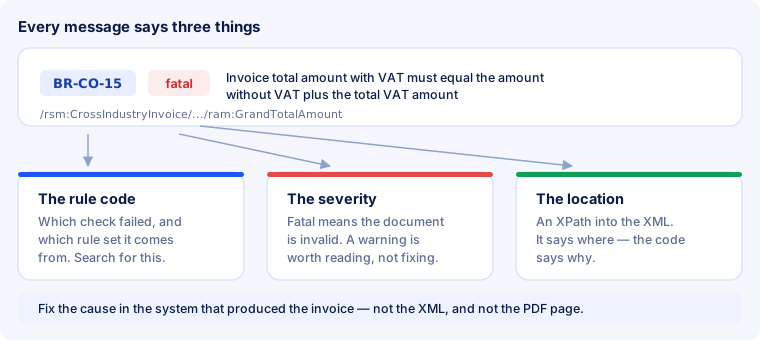
A validation report mixes two severities, and confusing them wastes effort in both directions. A fatal finding means the document is invalid — it will be rejected. A warning flags something unusual but permitted: a recommended field left empty, a value that is legal but rarely used, or a rule from a national CIUS that does not apply to your document.
Warnings are worth reading once, because a recipient may enforce more than the standard does. They are not worth chasing to zero.
Fix the cause, not the file
When a rule fails, the message points at an element in the XML. The temptation is to edit that element and re-run the check. Resist it: in a hybrid invoice the PDF page and the embedded XML are supposed to say the same thing, and an XML patched by hand no longer matches the page next to it. That contradiction is worse than the original error and much harder to notice later.
Correct the data in the system that produced the invoice — the VAT identifier in your company profile, the rounding step in the invoicing tool, the missing line item — and generate the document again. The full procedure is in how to check an invoice.
Which rule set was your file measured against?
Three version numbers meet in a single validation run, and they are not the same thing:
- The format version. Factur-X 1.09.2 / ZUGFeRD 2.5.2, published on 4 August 2026 and in force from 1 September 2026 — a corrigendum to the 2.5 release of June 2026 that tightened consistency, rounding and VAT breakdown rules, mostly in the EXTENDED profile.
- The rule set version. The Schematron artefacts are versioned separately — EN 16931 Schematron v1.3.16 is the set that matches the corrected 2.5.2 release.
- The validator version. Independent of both. Mustang, the open-source validator most of this industry builds on, is at 2.26.0.
One clarification worth making, because it is widely glossed over: the semantic standard itself has been revised. CEN approved EN 16931-1:2026 in February 2026 and published it in May 2026, withdrawing the 2017 edition. The tooling has not followed yet — current Schematron sets still encode the 2017 semantics, and support for the new revision is expected with the release due in autumn 2026. Anyone claiming today to validate against the 2026 revision is worth asking exactly what they mean.
Code reference: the rules one by one
From here on every rule stands on its own: what it checks, how it fails in practice and what to change. Each entry has its own anchor — #BR-CO-15, for instance, jumps straight to the right place, so you can append the code from your report to this page's address.
All the amounts in the examples come from the same invoice, so the calculations fit together:
| Field | Meaning | Amount |
|---|---|---|
BT-131 | Line 1 — 3 × 249.00 | 747.00 |
BT-131 | Line 2 — 1 × 120.50 | 120.50 |
BT-106 | Sum of line net amounts | 867.50 |
BT-107 | Document level allowance | 17.50 |
BT-109 | Total amount without VAT | 850.00 |
BT-116 / BT-119 | Taxable amount and rate | 850.00 at 19 % |
BT-117 / BT-110 | VAT amount | 161.50 |
BT-112 | Total amount with VAT | 1011.50 |
BT-113 | Already paid | 200.00 |
BT-115 | Amount due for payment | 811.50 |
Totals and rounding
This family produces most rejections, and almost always over a cent. The rules form a chain: BT-106 → BT-109 → BT-110 → BT-112 → BT-115. Break one link and the rules after it report failures in turn — fix the first one, not all of them.
BR-CO-10 — sum of the lines
Sum of Invoice line net amount (BT-106) = Σ Invoice line net amount (BT-131).
In the example BT-106 must be exactly 747.00 + 120.50 = 867.50. It usually fails because a line amount from quantity × unit price lands on more than two decimals and the software only rounds the total: 3 × 82.99 is 248.97, not 249.00. Round every line first, then add up — never the other way round.
BR-CO-13 — net total
Invoice total amount without VAT (BT-109) = Σ Invoice line net amount (BT-131) − document level allowances (BT-107) + document level charges (BT-108).
867.50 − 17.50 + 0.00 = 850.00. The most common cause of failure: a discount was already applied inside the line prices and reported again as a document level allowance, so it is deducted twice. A discount belongs either in the lines or at document level, not in both.
BR-CO-14 — total VAT
Invoice total VAT amount (BT-110) = Σ VAT category tax amount (BT-117).
With a single rate this is trivial. Failures start as soon as two rates meet: 19 % and 7 % produce two lines in the VAT breakdown, and BT-110 must be the sum of both — not the larger line, and not the tax on the grand total.
BR-CO-15 — gross total
Invoice total amount with VAT (BT-112) = Invoice total amount without VAT (BT-109) + Invoice total VAT amount (BT-110).
850.00 + 161.50 = 1011.50. This is the code that shows up most often in practice, and behind it is almost never an arithmetic mistake but a rounding one: the application works internally with 849.995 and writes 850.00 into the XML, but derives the tax from the unrounded value. One cent apart, and the invoice is invalid. Whatever goes into the XML has to be what the invoice is actually based on.
BR-CO-16 — amount due
Amount due for payment (BT-115) = Invoice total amount with VAT (BT-112) − paid amount (BT-113) + rounding amount (BT-114).
1011.50 − 200.00 = 811.50. A typical failure on part invoices: the deposit sits in the free text of the payment terms instead of BT-113, and then the amount due matches nothing. What the recipient is meant to transfer belongs in a field, not in a sentence.
BR-CO-17 — tax per category
VAT category tax amount (BT-117) = VAT category taxable amount (BT-116) × rate (BT-119) / 100, rounded to two decimals.
850.00 × 19 / 100 = 161.50. The rounding is part of the rule — half up to two decimals, not truncation. Cutting 161.495 down to 161.49 fails.
BR-DEC-* — two decimals at most
For example BR-DEC-12 for the net total (BT-109), BR-DEC-14 for the gross total (BT-112), BR-DEC-19 for the taxable amount (BT-116).
More than twenty rules in this family say the same thing about one money field each: more than two decimals is not allowed. A single 850.0000 out of a database export is enough. Not to be confused with the quantity and unit price fields, where more decimals are permitted — which is why this usually only hits the total fields.
The fastest way through the chain. Work bottom-up: is BT-106 right? Then BT-109, then each line of the VAT breakdown, then BT-110, then BT-112. The first break almost always explains every message after it.
VAT by category
Every line carries a VAT category code, and each of those codes has its own family of rules. So the family you see in your report already tells you which category was used: S standard rate, Z zero rated, E exempt, AE reverse charge, K intra-community supply, G export, O not subject to VAT.
BR-S-01 — category missing from the breakdown
If the invoice contains a line, an allowance or a charge with the category “Standard rated”, the VAT breakdown must contain at least one line with the same category.
The line says “19 %”, but the VAT breakdown in the invoice header does not know that category. This regularly appears when a line is added later and the breakdown is not recalculated. Every family has the same rule: BR-Z-01, BR-E-01, BR-AE-01 and so on.
BR-S-02 — no tax number with standard rate
An invoice with a line in the category “Standard rated” must carry the Seller VAT identifier (BT-31), the Seller tax registration identifier (BT-32) and/or a tax representative's VAT identifier (BT-63).
If you charge VAT you have to say under which number. Common among small businesses that pick the standard rate by mistake instead of category E — the invoice is then wrong not only formally but fiscally.
BR-S-08 — taxable amount per rate
For each rate: taxable amount (BT-116) = Σ net amounts of the lines at that rate + charges − allowances at that rate.
The classic two-rate case: a document level allowance is assigned entirely to the 19 % line although it should be split proportionally between 19 % and 7 %. A document level allowance carries a category of its own — it has to be set, and with mixed rates it has to be apportioned.
BR-S-09 — tax per rate
The tax amount of the breakdown line (BT-117) must equal the taxable amount (BT-116) multiplied by the rate (BT-119).
Almost the same as BR-CO-17, but about the individual line. If you see both, the fault is in that one line.
BR-Z-01 and BR-Z-08 — zero rate
Exactly one line with “Zero rated”, and its taxable amount must equal the sum of the zero-rated lines.
Zero rated means taxable at 0 %. Not to be confused with exempt (E), and not with “not subject to VAT” (O). That confusion is the most common reason this family appears at all.
BR-E-10 — exemption without a reason
A breakdown line with “Exempt from VAT” must carry an exemption reason — as a code (BT-121) or as text (BT-120).
You may invoice without VAT, but you have to state why. An empty field is not enough, and neither is a dash. For a small business exempt under national rules, the corresponding note belongs here.
BR-AE-10 — reverse charge without a note
A breakdown line with “Reverse charge” must carry an exemption reason meaning reverse charge — as a code (BT-121) or as text (BT-120).
Stating that the liability shifts to the recipient is not a courtesy, it is mandatory. It may be in your own language, but it has to be there. If the buyer's VAT identifier is missing as well, you will also see BR-AE-02 or BR-AE-03.
BR-AE-08 and BR-E-08 — taxable amount at 0 %
Even without tax, the taxable amount of the line must equal the sum of the corresponding invoice lines.
The tax amount here is 0.00 — the taxable amount is not. Setting both fields to zero fails: the sum of the lines goes into BT-116 unchanged.
BR-IC-11 — intra-community supply without a date
With the category “Intra-community supply”, neither the actual delivery date (BT-72) nor the invoicing period (BG-14) may be blank.
On a VAT-free supply to another EU country the recipient needs to know when delivery happened — the invoice date is not enough. Either of the two fields will do.
BR-O-11 — “not subject to VAT” mixes with nothing
An invoice that contains a VAT breakdown line with “Not subject to VAT” must not contain any other breakdown line.
This category excludes all others: an invoice is either entirely out of scope or not at all. It shows up when a pass-through item — a fee paid on the customer's behalf, a disbursement — is marked O while the rest is taxed normally. Such items do not belong on the same invoice.
Mandatory content
These rules catch files where something is simply missing. They are rare when the invoice comes out of a program and common when the XML was written by hand or from a template.
BR-01 — specification identifier
An invoice shall have a Specification identifier (BT-24).
This is the string that says which profile the file was built to — urn:cen.eu:en16931:2017, for example. Without it the validator does not know what to check against and the recipient does not know what they received. In practice it is missing only from hand-written XML.
BR-02 to BR-05 — number, date, type, currency
Invoice number (BT-1), issue date (BT-2), invoice type code (BT-3) and currency code (BT-5) must be present.
Four separate rules for four header fields. The type is a code from UNTDID 1001 — 380 for an ordinary invoice, 381 for a credit note; free text in that place also triggers a BR-CL-* message.
BR-06 to BR-09 — seller and buyer
Seller name (BT-27), buyer name (BT-44), seller postal address (BG-5) and the country code within it (BT-40).
BR-09 is the most frequent of the four: street and town are filled in, the country code is not. It has to be a two-letter ISO 3166-1 code — DE, not Germany.
BR-16 — not a single line
An invoice shall have at least one invoice line (BG-25).
This happens when the invoice consists of totals only — for instance in a file generated from a PDF whose line table was not recognised. A single collective line for the total amount is better than none.
BR-CO-09 — country prefix on the VAT number
The seller VAT identifier (BT-31), the tax representative's (BT-63) and the buyer's (BT-48) must start with an ISO 3166-1 alpha-2 country code. Greece may additionally use EL.
123456789 becomes DE123456789. By far the most common case: the number sits in the master data without a prefix because it has been kept that way for years. Spaces and dots do not belong there either.
BR-CO-26 — seller cannot be identified
So that the buyer can identify the supplier automatically, the seller identifier (BT-29), the seller legal registration identifier (BT-30) and/or the seller VAT identifier (BT-31) must be present.
At least one of the three, not all. The most common trigger on converted third-party invoices: the PDF shows a national tax number in a format that is not a VAT identifier, so it ends up in none of the three fields. Better to fill the registration identifier than to leave all three empty.
The German extension (BR-DE-*)
The BR-DE-* rules do not come from EN 16931 itself but from XRechnung, the German CIUS. They demand entries the standard leaves optional. Important for reading your report: a ZUGFeRD invoice that is not meant to be an XRechnung does not have to satisfy them — the validator reports them anyway, because it applies every rule set it knows.
BR-DE-1 — no payment instructions
An invoice must contain PAYMENT INSTRUCTIONS (BG-16).
No payment route, no XRechnung. For a transfer that means IBAN and the payment means code; for a direct debit or cash payment, the corresponding code.
BR-DE-2, BR-DE-5 to BR-DE-7 — contact details
The SELLER CONTACT group (BG-6) must be present, and within it the contact point (BT-41), telephone number (BT-42) and email address (BT-43).
Four rules, one block. A generic address such as invoices@… is fine, as is a department name — it only has to be filled in. If the block is missing entirely you will see all four messages at once.
BR-DE-14 — VAT rate missing
The element VAT category rate (BT-119) must be present.
EN 16931 allows the rate to be omitted for certain categories; XRechnung does not. On VAT-free lines you must explicitly enter 0, not nothing.
BR-DE-15 — buyer reference missing
The element Buyer reference (BT-10) must be present.
In business with German public authorities this is the Leitweg-ID: the routing identifier by which the invoice portal recognises which body an invoice belongs to. It comes from the order or the contract; it cannot be invented, and without it the invoice is not delivered. In purely private business any buyer reference will do.
BR-DE-16 — tax identification for most categories
If the tax codes S, Z, E, AE, K, G, L or M are used, at least one of Seller VAT identifier (BT-31), Seller tax registration identifier (BT-32) or SELLER TAX REPRESENTATIVE PARTY (BG-11) must be present.
The German tightening of BR-S-02: it applies not only to the standard rate but to practically every category.
BR-DE-17 — invoice type not allowed
For Invoice type code (BT-3) only 326 (partial invoice), 380 (commercial invoice), 384 (corrected invoice), 389 (self-billed invoice) and 381 (credit note) are allowed.
The UNTDID code list has dozens of values; XRechnung permits five of them. Marking a pro-forma invoice as 325 fails here.
BR-DE-18 — early payment discount in the wrong format
A discount for early payment must follow a fixed pattern inside Payment terms (BT-20): #SKONTO#TAGE=n#PROZENT=n.nn#.
The only rule that imposes a syntax on a free-text field. “2 % discount if paid within 14 days” reads well and is still invalid — the recipient is meant to process it automatically.
BR-DE-19 — implausible IBAN
If the payment means is SEPA credit transfer (code 58), the Payment account identifier (BT-84) should contain a valid IBAN.
Length, country code and check digits are verified. In practice it usually fails on spaces: DE89 3704 0044 0532 0130 00 is right for humans and wrong for the check — the XML needs the IBAN without separators. BR-DE-20 says the same about direct debit (code 59).
BR-DE-21 — the message almost everyone sees
The element Specification identifier (BT-24) should match the identifier of the XRechnung standard.
This message appears on every valid ZUGFeRD and Factur-X invoice, and there it is not a fault. All it says is: “this is not an XRechnung.” Which is true — and exactly what you intend when you issue ZUGFeRD. Discount this one message before you judge your report; our own report already does that for you.
BR-DE-26 — correction without a reference
If invoice type 384 (corrected invoice) is used, at least one PRECEDING INVOICE REFERENCE (BG-3) must be present.
A correction that does not say what it corrects cannot be matched. The number and date of the original invoice belong in BG-3, not in free text.
And the French rules? BR-FR-* come from the French CIUS and behave exactly like the German ones: they appear in the report but only apply if you are issuing to the French profile. More on that under Factur-X.
Reading your own report
The quickest way to understand a rule is to watch it fire on a file you know. Upload an invoice to our validator — it is free and unlimited, runs the same Schematron sets described here, and reports every finding with its rule code, its severity and its location. What happens at each of the three layers is described in how validation works.