
A first e-invoice is rarely a technical problem. Technically it means building a PDF/A-3, generating CII XML and putting one inside the other — a tool does that in seconds. The real work comes before: gathering details that were never all present on a paper invoice.
This guide walks the path once, in the order in which it actually goes wrong — with a worked example, the fields that matter, and the mistakes almost everybody makes the first time.
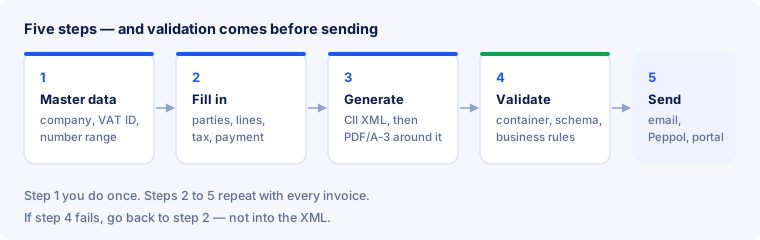
Do you even have to yet?
The question is worth asking before you invest time, because the answer decides the order of things — not whether you should do it.
- Receiving has been mandatory for a while. In Germany every business has had to accept structured invoices since 1 January 2025. That needs no software, but it does need an address where the files arrive and a place where they are filed.
- Issuing from 1 January 2027 if your previous year’s turnover was above €800,000, and from 1 January 2028 for all remaining B2B turnover.
- Exempt are small-amount invoices up to €250 gross and sales to consumers; small businesses under § 19 are permanently exempt from issuing — though they too must be able to receive.
- Invoices to public bodies are usually electronic already today, and then normally XRechnung with a Leitweg-ID.
The deadlines country by country — France, Belgium, Poland, Italy, Spain — are in Deadlines and obligations. Starting before your own deadline has one clear advantage: your first invoice is not the one a customer is waiting for.
What you need before you start
Work through this list before you open any form. If something is missing, no tool will help — it has to be obtained.
| Detail | Field | Where it comes from |
|---|---|---|
| Legal name and address with country code | BT-27, BG-5 | your company register entry, not your logo |
| VAT number with country prefix | BT-31 | the notice from the tax office |
| Buyer name | BT-44 | contract or purchase order — the legal name |
| Buyer reference | BT-10 | ask the customer. For public bodies this is the Leitweg-ID |
| Purchase order number | BT-13 | from the customer’s order |
| Bank details | BG-16 | your IBAN — as a field, not as a footer line |
| Delivery date or period | BT-72 or BG-14 | your delivery or service record |
The fourth row is where first invoices get stuck most often. Buyer reference and order number appear on no old invoice; they come from the customer, and with larger customers they decide whether the invoice is booked automatically or hunted down by hand. Ask for both when you take the job.
Two details paper invoices almost never carry properly. The country code in the address — the word “Germany” is not enough — and the country prefix of the VAT number. On a printed invoice both are decoration; in a structured invoice they are mandatory.
Step 1 — choose the profile
The profile determines how much data your file carries. For the normal case there is only one sensible answer: EN 16931. It matches the standard, is accepted everywhere, and leaves nothing out.
- BASIC is enough for simple invoices without discount tiers, without a separate delivery address, without foreign currency.
- EXTENDED you only need if a recipient requires a field the standard does not know — and then they can name it.
What not to choose: MINIMUM or BASIC WL. Both pass every technical check and still do not count as an e-invoice for VAT purposes — MINIMUM carries header data only, BASIC WL no line items at all. That is why we deliberately do not offer them. The smallest usable profile is BASIC.
Step 2 — set up master data once
Company name, address, VAT number, logo, bank details, payment terms and the numbering range belong in the settings, not in every invoice. The reason is not convenience but error prevention: a typo in a VAT number that gets retyped on every invoice repeats for a year and only surfaces when a recipient checks the number.
While you are there, check three things paper invoices are often vague about:
- The country code in the address. The word “Germany” is not enough, the code is required. Without it the invoice does not get through.
- The country prefix of the VAT number.
DE123456789, not123456789. BR-CO-09 insists on it. - The IBAN as a field. If it only appears in the footer of your template, it does not exist as far as software is concerned — BR-DE-1 then flags missing payment details even though the number is visible on the page.
Step 3 — fill in the invoice
In E-Rechnung Pro you first pick one of four templates — service invoice, sales and order invoice, partner settlement or payout statement. The template only determines what the visible page looks like; the structured data behind it is the same set of standard fields in every case.
Then you enter:
- The parties. Your details come from the settings, the customer’s from the contract. Copy the legal name exactly — not the short form in your address book.
- The line items. Per line: description, quantity, unit price, tax rate. What is missing here is missing in the XML later.
- Discounts and charges as separate entries, not folded into the unit price. Shipping and packaging likewise. Hidden amounts are the most common reason the recipient’s totals check fails.
- The tax category per line. Standard rate, reduced, exempt, reverse charge — and for the last two a reason belongs with it, or validation will object.
- Payment terms, with a concrete due date rather than “payable within 14 days”.
Early-payment discount is the one case where a free-text field has a syntax. “2 % discount if paid within 10 days” reads well and is worthless to a machine. What is required in BT-20 is the pattern #SKONTO#TAGE=10#PROZENT=2.00# — see BR-DE-18. The readable sentence can go on the page in addition.
A sample invoice, worked through
Nothing makes the fields clear as quickly as an invoice with real figures. An agency bills a business customer for two services and a printed manual — two tax rates, one allowance, one shipping charge.
| Line | Quantity | Unit price | Net | Category |
|---|---|---|---|---|
| Website relaunch, fixed fee | 1 | €2,400.00 | €2,400.00 | S, 19 % |
| Hosting, monthly | 12 | €15.00 | €180.00 | S, 19 % |
| Printed manual | 5 | €24.00 | €120.00 | S, 7 % |
On top of that: a €100.00 loyalty allowance at document level (category 19 %) and a €20.00 shipping charge (category 7 %). That produces the total fields — and this chain is exactly what every validator checks later:
| Field | Meaning | Calculation | Amount |
|---|---|---|---|
BT-106 | sum of line net amounts | 2,400.00 + 180.00 + 120.00 | €2,700.00 |
BT-107 | document-level allowances | loyalty allowance | €100.00 |
BT-108 | document-level charges | shipping | €20.00 |
BT-109 | total without VAT | 2,700.00 − 100.00 + 20.00 | €2,620.00 |
BT-116 (19 %) | taxable base, standard rate | 2,580.00 − 100.00 | €2,480.00 |
BT-117 (19 %) | VAT, standard rate | 2,480.00 × 19 % | €471.20 |
BT-116 (7 %) | taxable base, reduced rate | 120.00 + 20.00 | €140.00 |
BT-117 (7 %) | VAT, reduced rate | 140.00 × 7 % | €9.80 |
BT-110 | total VAT amount | 471.20 + 9.80 | €481.00 |
BT-112 | total with VAT | 2,620.00 + 481.00 | €3,101.00 |
BT-115 | amount due for payment | no prepayment | €3,101.00 |
Three things can be read off this table, and they explain most of the error messages of the first few weeks:
- Allowances and charges belong to a tax category. The loyalty allowance lowers the 19 per cent base, the shipping charge raises the 7 per cent base. An allowance without a category trips BR-S-08 — and usually a second rule right behind it.
- VAT is calculated per category, not on the final total. 2,620.00 × 19 % would be €497.80 — and wrong. Two rates mean two lines in the breakdown, and
BT-110is their sum. - Every figure in the chain is a field of its own. The recipient does not recalculate them, they read them — and compare them with their own records. So every one has to be right, not just the final amount.
What appears on the visible page is the same invoice in readable form. What your customer books is the fields above.
Step 4 — generate the file
After you click “Create”, three things happen in sequence:
- Your data becomes CII XML following the EN 16931 model, in the profile you chose.
- The readable page is rendered and written as PDF/A-3 — the archival format without which a hybrid invoice is not possible.
- The XML is embedded into that PDF as an attachment and declared in the metadata, so a recipient finds it without taking the file apart.
The result is one file. Not a PDF with an XML beside it — that would be something else, and many recipients would not recognise it as an e-invoice.
Step 5 — check before you send
This is the step people skip once and never again. A check takes seconds; a rejected invoice costs a payment cycle.
Validation runs in three layers: the PDF/A-3 container, the XML against its schema, then the business rules. Read the report from top to bottom — a failure higher up makes the findings below it unreliable. You can check the file with us without signing up; the detailed procedure is in Check an invoice.
On the very first invoice one more look pays off, one no validator can do for you: does the visible page agree with the data? Open the PDF, read the amounts, and compare them with the fields the report lists. If the two differ that is not a cosmetic flaw — in a hybrid invoice the structured part governs.
Fix the cause, not the file. If the report says the VAT number is missing, it belongs in the master data and the invoice is regenerated. Patching the XML by hand is tempting and almost always wrong: the visible page no longer matches the data afterwards, and that contradiction is worse than the original error.
Step 6 — send it
The standard says nothing about how the invoice reaches the recipient. Three routes are common:
- Email. Perfectly acceptable in German B2B and the simplest route. Send the PDF/A-3 as an attachment, not as a download link — the XML travels inside the file.
- Peppol. Where the recipient expects delivery over the network it goes through an access point; how the network works is described in Peppol.
- A customer portal. Large companies and public bodies often insist on their own upload form; in France the route additionally goes through an approved platform (see Factur-X).
E-Rechnung Pro creates and validates the document; sending it is yours to do, over the channel your customer uses. Ask which one they expect the first time — that is faster than finding out after the invoice has been sitting somewhere.
Special cases: small business, reverse charge, cross-border
Three situations are so common that they are hardly special any more. All three come down to the same thing: the right tax category and the reason that goes with it.
- Small business under § 19 UStG. Category
E(exempt), rate 0 %, and an exemption reason in text — without it BR-E-10 objects. Small businesses need not issue e-invoices, but they must be able to receive them. - Reverse charge. Category
AE, rate 0 %, a note that the liability is reversed, and here the buyer’s VAT number is not optional but a precondition. - Intra-community supply. Category
K, both VAT numbers, and a delivery or service date: without the date BR-IC-11 objects.
One invoice may carry several categories at once — each produces its own line in the tax breakdown. Which category applies when, and what reason is expected, is covered in detail in VAT in e-invoices.
Numbering invoices properly
The standard prescribes no format but does require uniqueness. Three habits save trouble later:
- Sequential and without gaps. Gaps are something you have to explain in an audit.
- One prefix per legal entity if you have several — each entity runs its own series and has its own seller details too.
- No characters systems trip over. Slashes and spaces are handled inconsistently; letters, digits and hyphens are safe.
Avoiding duplicates during the switch
When moving to a structured format, the same invoice goes out twice surprisingly often — once the old way, once the new. Three precautions:
- A number series that never repeats across all systems.
- Before sending, a look at the pair invoice number + seller VAT number — that combination identifies a document uniquely.
- A clear cut-over: from day X only the new system issues, the old one only archives.
After sending: archiving
Sending does not finish the invoice. What must be kept is the structured part, unchanged and machine-readable — not a printout and not a screenshot. Under § 14b UStG the period is eight years; it was shortened from ten at the end of 2024 and applies in this form from 1 January 2025.
In practice that means three things: the original file stays as it was sent; it must remain findable for the whole period; and who files what where is worth writing down once. The hybrid file makes the first point easy, because page and data sit in one document. The details — including what GoBD requires beyond that — are in Archiving and GoBD.
Typical first-invoice mistakes
| What happens | What causes it |
|---|---|
| The totals do not add up | discount hidden in the unit price instead of shown as an allowance |
| The VAT number is objected to | country prefix missing |
| The invoice comes back although it is valid | buyer reference missing — the recipient cannot assign it |
| The exemption is flagged | category set, reason missing |
| The recipient sees no XML | PDF and XML sent separately instead of as one file |
| Delivery date missing | only the invoice date was set, not the delivery date |
| Early-payment discount not recognised | written out as a sentence instead of the required pattern in BT-20 |
| Payment details reported missing | IBAN only in the template footer, not as a field |
Frequently asked questions
Do I need to know XML?
No. You need complete data. You should be able to read what a validation report says — the rule code and its explanation are enough for that.
Can I keep my current layout?
The visible page is yours. In a hybrid invoice it is not replaced but supplemented with the structured data — the customer sees what they saw before.
Does the first invoice have to go to a customer?
No, and it is a good idea not to. Create an invoice with real master data and made-up line items, have it validated, and look at the report. That way you find your own gaps before a recipient does.
As a small business under § 19, do I have to issue e-invoices?
No, small businesses are permanently exempt from the obligation to issue. You must still be able to receive and archive structured invoices. If you issue one voluntarily, it needs tax category E with an exemption reason.
What is a Leitweg-ID and do I need one?
It is the delivery address of German public bodies and goes into the buyer reference, BT-10. You do not need one of your own — you need the recipient’s, and only when you invoice a public body. Missing there, BR-DE-15 objects.
What about credit notes?
A credit note is a document type of its own, not an invoice with negative amounts. The type code changes from 380 to 381, the amounts stay positive, and the corrected invoice is referenced — details in XML structure.
How long do I have to keep the file?
Eight years under § 14b UStG, and what must be kept is the structured part — unchanged and traceable. The hybrid file satisfies that on its own, because both parts live in one document.
What if my customer cannot process the file?
Then they open it as an ordinary PDF and read it as before. That is the advantage of the hybrid format: it works even with a recipient who has not switched to anything yet.
Can I correct an invoice I have already sent?
Not by overwriting it. You issue a credit note or a corrected invoice with its own number that references the original document.
In short
- The work is in the data, not the technology. Go through the list above before you start.
- Profile: EN 16931, as long as nobody demands otherwise. Never MINIMUM or BASIC WL.
- Master data once, invoices often. Get the country code, the VAT number prefix and the IBAN-as-a-field right immediately.
- Show discounts, shipping and early-payment terms — each with its tax category, never folded into the unit price.
- The chain of totals has to hold per category, not only at the end.
- Validate before sending — and fix the cause, not the XML.
- Send one file, as an attachment, over your customer’s channel — and keep it unchanged for eight years.
Ready to produce that first invoice without hand-written XML? Create a free account — or first check a file you already have without signing up and see what a report actually tells you.