
The place where hybrid invoices most often break is neither creating them nor checking them. It is the handover to the accountant — because that is where somebody “makes the file suitable”: prints it, scans it, saves it again as a PDF. After that it is no longer an e-invoice.
This is orientation, not tax advice. Which routes your accounting firm uses, and what it needs from you, is settled in one conversation — it takes ten minutes and saves a year of wrong files.
Two things are called “handover”, and they have nothing to do with each other
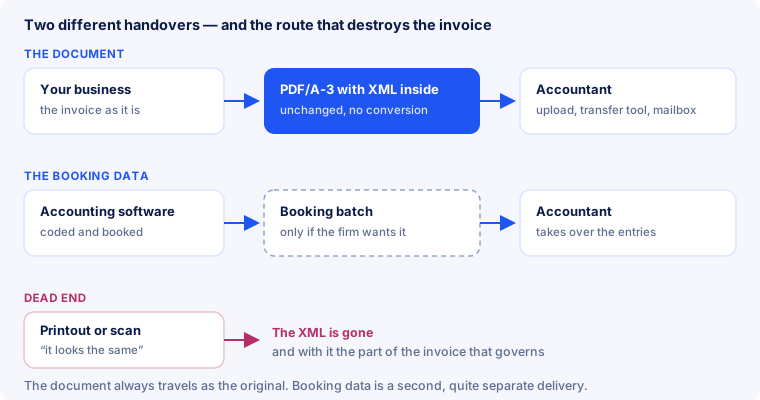
- The document — the invoice itself, as a file. For a hybrid invoice that is the PDF/A-3 with the embedded XML, unchanged.
- The booking data — coded journal entries out of accounting software, as a batch. That is an entirely different delivery, and whether your firm wants it at all is their call: if they do the bookkeeping, the documents are enough.
Confusing the two sends people hunting for an “interface” where none is needed. On the document route the standard is the interface — the file already sits in the format the other side can read.
On the receiving side these are two separate services as well: one for documents together with their data, another for finished booking batches. So the question to put to your firm is not “which interface?” but “do you do the bookkeeping yourselves?”. If they do, you owe them the documents and nothing else — which is the case for most small businesses. Only when your own software books and the firm merely takes the entries over does the second route come into play at all.
What DATEV accepts
In Germany, “how do I get this to my accountant” usually means DATEV. What matters in practice:
- DATEV Unternehmen online can prefill document capture from ZUGFeRD 2.x and XRechnung — the structured data is read out instead of typed in.
- Ways in: DATEV Upload online, DATEV Belegtransfer or DATEV Upload Mail. ⚠️ For Upload Mail, DATEV states a limitation: ZUGFeRD yes, a bare XRechnung as a single XML file no.
- Nobody has to convert anything. What you hand over is the hybrid file itself; the XML rides along inside it.
That matches what the German tax administration names as the usual formats: XRechnung and ZUGFeRD from version 2.0.1 — except the MINIMUM and BASIC WL profiles, which do not count as an e-invoice at all. Which profile is good for what is covered under profiles.
The mistake that undoes everything: print and scan
A scan looks like the invoice. It is not the invoice any more: the XML lives in the original and does not survive the detour over paper. This is not a cosmetic issue — the German Ministry of Finance letter of 15 October 2025 makes clear that in hybrid formats the structured part prevails. Destroy it and you have handed your accountant a picture instead of a document, and put the input tax deduction at risk.
The same goes for well-meant intermediate steps: re-saving as PDF, merging several invoices into one file, stamping, compressing. Each of those can strip the attachment or break PDF/A conformance. More on that under PDF/A-3.
What the accountant actually needs
| You supply | Why |
|---|---|
| the original file, unchanged | only it contains the part that governs |
| one single agreed route | documents that arrive sometimes by mail and sometimes by upload get lost |
| complete invoices, not only outgoing ones | the obligation applies to both sides, incoming included |
| a heads-up when something changes | new software, new format, new number ranges |
And one thing the firm does not supply: your archive. The retention obligation stays with the business that issued or received the invoice, with everything set out under retention. A folder in their practice software is no substitute for your own.
If you are only now switching over
The switch unsettles the other side most — customers used to a plain PDF, and a firm seeing your files for the first time. What works:
- One test document before the first real one. Send an invoice down the agreed route and have the firm confirm that the data arrives on their side, not just the file.
- Tell customers in advance: from which date, that the file still opens like an ordinary PDF, and who to ask if their system refuses it.
- Keep a fallback route for the first weeks. Anyone who cannot process the file gets it the old way as well — until they can.
- Do not switch mid-month. A clean cut on the first of a month spares the firm the sorting.
For accounting firms: what changes day to day
Little changes on the outgoing side; on the incoming side, almost everything. Data arrives structured, so the typing disappears — and the work shifts to checking. The German Ministry of Finance letter of 15 October 2025 offers a useful split into three kinds of error:
| Kind | Who notices it | Who can fix it |
|---|---|---|
| format error | any validation, immediately | the issuer |
| business rule violation | validation, with a rule code | the issuer |
| content is wrong (§ 14/14a UStG) | nothing automatically | only client and firm together |
That third row is the actual work: a file can be technically flawless and still carry the wrong delivery period, the wrong VAT category or a description nobody can make sense of. What the first two rows mean is covered under business rules; what validation proves and what it does not, under validation.
What E-Rechnung Pro can do here — and what it cannot
No DATEV connector, and the document route does not need one: the file is already in the format practice software reads. For this job the standard is the interface.
- What helps: check the invoice before handing it over. A file that fails the standard will fail on import too — the difference is whether you find out or your accountant does.
- Several at once: batch processing — on the VIP plan — converts several PDF invoices in one run and emails you the result as a ZIP archive.
- What the service does not do: it sends no invoices to third parties — not to your customers, not to your accountant — and exports no booking batches. Generated files are deleted after 24 hours; the archive is yours to keep.
Frequently asked questions
Do I need a DATEV connector to give my accountant e-invoices?
Not for the document route. The hybrid file is handed over unchanged, and DATEV Unternehmen online reads ZUGFeRD 2.x and XRechnung. You need an interface only once booking data is to be transferred as well.
Can I just print the invoice and scan it?
No. The scan is a picture; the XML stays behind in the original. Since the structured part prevails in hybrid formats, you would be giving away the actual document.
Which profile should I use for my accountant?
EN 16931 is the safe choice. MINIMUM and BASIC WL are not e-invoices, and EXTENDED is only for fields the standard does not know.
Should I also send a separate PDF alongside?
No need — the hybrid file is a PDF and opens like one. Two files side by side only raise the question of which one counts.
What about incoming invoices from suppliers?
They travel the same route, unchanged. Checking pays off especially here: with a faulty incoming document the input tax deduction is your problem, not your supplier's.
Who keeps the invoices — me or the firm?
You do. The firm works with them, but the retention obligation sits with the business that issued or received the invoice.
How do I tell my customers?
With a date, a note that the file still opens like the PDF they know, and a contact in case their system baulks. Three sentences are enough.
In short
- Document and booking data are two deliveries — most businesses owe only the first.
- The file goes unchanged: PDF/A-3 with XML, no conversion, no re-saving.
- Printing and scanning destroys the part that governs.
- DATEV Unternehmen online reads ZUGFeRD 2.x and XRechnung; Upload Mail has the limitation on bare XML files.
- One route, agreed once, beats three improvised ones.
- Check before your accountant has to — content errors no software will find anyway.
Worth a quick check before the next handover? Upload the file — no sign-up, and the result names the rule and the field.